概况

本实验通过了所有 OJ 样例,实现了所有必做功能

必答题备忘链接
程序是个状态机-理解YEMU的执行过程
整理一条指令在 NEMU 中的执行过程
程序如何运行-理解打字小游戏如何运行
编译与链接 1
编译与链接 2
了解 Makefile

不停计算的机器

理解 YEMU 如何执行程序

理解 YEMU 如何执行程序

YEMU 可以看成是一个简化版的 NEMU, 它们的原理是相通的, 因此你需要理解 YEMU 是如何执行程序的. 具体地, 你需要

  • 画出在 YEMU 上执行的加法程序的状态机
  • 通过 RTFSC 理解 YEMU 如何执行一条指令

思考一下, 以上两者有什么联系?

画出在 YEMU 上执行的加法程序的状态机

在 YEMU 上执行的加法程序为:

1
2
3
4
5
6
7
8
9
10
uint8_t M[NMEM] = {   // 内存, 其中包含一个计算z = x + y的程序
0b11100110, // load 6# | R[0] <- M[y]
0b00000100, // mov r1, r0 | R[1] <- R[0]
0b11100101, // load 5# | R[0] <- M[x]
0b00010001, // add r0, r1 | R[0] <- R[0] + R[1]
0b11110111, // store 7# | M[z] <- R[0]
0b00010000, // x = 16
0b00100001, // y = 33
0b00000000, // z = 0
};

状态机视角:状态由内存状态,寄存器(这里有四个)和 PC 唯一确定下来。

1
2
3
4
5
6
7
# <pc ,<mem>, <regs>>
<0, <0,0,0,0>, <16,33,0>> --load 6#--> <1, <33,0,0,0>, <16,33,0>>
<1, <33,0,0,0>, <16,33,0>> --mov r1,r0--> <2, <33,33,0,0>, <16,33,0>>
<2, <33,33,0,0>, <16,33,0>> --load 5#--> <3, <16,33,0,0>, <16,33,0>>
<3, <16,33,0,0>, <16,33,0>> --add r0,r1--> <4, <49,33,0,0>, <16,33,0>>
<4, <49,33,0,0>, <16,33,0>> --store 7#--> <5, <49,33,0,0>, <16,33,49>>
// 正确计算了

通过 RTFSC 理解 YEMU 如何执行一条指令

YEMU 的 exec_once 函数是执行一条执行的函数。
具体来说,执行一条指令通过这几个步骤:

  • 取指:
    • 根据 PC 取指令,this.inst = M[pc]
  • 译码
    • inst_t 结构体是一个联合体:这很方便用同样组织的内存空间同时解读不同的指令类型。
    1
    2
    3
    4
    5
    typedef union {
    struct { uint8_t rs : 2, rt : 2, op : 4; } rtype;
    struct { uint8_t addr : 4 , op : 4; } mtype;
    uint8_t inst;
    } inst_t;
    • 然后译码通过 switch 语句完成
    • 操作码:不同的 case 有不同的二进制数,匹配着不同指令的操作码部分(这里是前 4 位代表)。操作码也同时表示了是 M-type 还是 R-type, 保证不同的处理规则。
    • 操作数:操作数的获取也是通过联合体的不同内存位置获取的
      • #define DECODE_R(inst) uint8_t rt = (inst).rtype.rt, rs=(inst).rtype.rs
      • 这是一个带参数的宏

未识别的指令行为

YEMU 在 switch 的 default 部分写了一些逻辑。
未识别的指令,会打印 Invalid instruction 信息,更新 halt = 1 标识结束。

  • 执行
    • 译码完成之后,执行部分使用 C 语言对寄存器和内存进行操作。如 R[rt] =R[rs]
  • 更新 PC
    • 要做到章节标题中的[[#不停计算的机器]]我们需要更新 PC
    • 在未涉及到主动跳转的情况下,我们 simply do pc ++

这两者有什么联系?

状态机的转换实际是由我们执行指令这个行为所激励着的。在执行一条指令的时候,我们完成了更新状态(包括寄存器、内存、PC)的操作,更新 PC 则同时为下一条指令的执行做好了准备(装入内存中对应指令。)状态机就这样周而复始的运作下去了。

RTFSC (2)

RTFSC 理解 NEMU 指令执行的过程
1
2
3
4
5
6
7
8
9
10
11
// nemu/src/cpu/cpu-exec.c 
static void execute(uint64_t n) {
Decode s;
for (;n > 0; n --) {
exec_once(&s, cpu.pc);
g_nr_guest_inst ++;
trace_and_difftest(&s, cpu.pc);
if (nemu_state.state != NEMU_RUNNING) break;
IFDEF(CONFIG_DEVICE, device_update());
}
}

本函数创建了一个结构体 Decode s 作为解码指令的结构。其包含了 pc, snpc, dnpcisa 的信息。

execute(uint64_t n)n 代表执行多少条指令的意思。

对于每一条指令:

1
2
3
4
5
6
7
8
9
10
11
12
13
14
15
16
17
18
19
20
21
22
23
24
25
26
27
28
29
static void exec_once(Decode *s, vaddr_t pc) {
s->pc = pc;
s->snpc = pc;
isa_exec_once(s);
cpu.pc = s->dnpc;
/* some other isa and trace stuff */
}

// nemu/src/isa/$ISA/inst.c
// Start to parse the decode
int isa_exec_once(Decode *s) {
s->isa.inst = inst_fetch(&s->snpc, 4); // the update of snpc is here
// Add itrace here
IFDEF(CONFIG_ITRACE, ringbuf_push(&itrace_rb, s->pc, s->isa.inst));
return decode_exec(s);
}

// nemu/include/cpu/ifetch.h
// 取指令,实际就是从内存加载
static inline uint32_t inst_fetch(vaddr_t *pc, int len) {
// vaddr_ifetch is aka paddr_read
uint32_t inst = vaddr_ifetch(*pc, len);
// update the pc
(*pc) += len;
// inst is a 32bit uint number(for our riscv32)
return inst;
}


这里有一个有趣的问题

编译与链接 1

尝试去掉 staticinline 试试?

nemu/include/cpu/ifetch.h 中, 你会看到由 static inline 开头定义的 inst_fetch() 函数. 分别尝试去掉 static, 去掉 inline 或去掉两者, 然后重新进行编译, 你可能会看到发生错误. 请分别解释为什么这些错误会发生/不发生? 你有办法证明你的想法吗?
去掉各一个不会报错,去掉两者会报错。

1
2
/usr/bin/ld: /home/zhu/nju-pa/nemu/build/obj-riscv32-nemu-interpreter/src/isa/riscv32/inst.o: in function `inst_fetch':
inst.c:(.text+0x1600): multiple definition of `inst_fetch'; /home/zhu/nju-pa/nemu/build/obj-riscv32-nemu-interpreter/src/engine/interpreter/hostcall.o:hostcall.c:(.text+0x0): first defined here

多个包含了 ifetch.c 文件,发生了多定义问题。
首先要理解include 的本质就是把该 .h 文件复制到 include 的部分。
inline 作为内联关键字,其在所有引用 ifetch 的部分会替换为这部分文字所以不涉及重复定义问题
static 声明了 ifetch 的链接属性internal linkage,它仅在当前源文件 (translation unit) 中可见,所以不会被其他文件引用到。
可以理解为每个文件都持有了一个互不干扰的副本(生成目标文件时候不会导出符号)

完成取指令之后就要开始译码了

1
2
3
4
5
6
7
8
9
10
11
12
13
14
15
16
17
18
19
20
21
22
23
24
static int decode_exec(Decode *s) {
s->dnpc = s->snpc;

#define INSTPAT_INST(s) ((s)->isa.inst)
#define INSTPAT_MATCH(s, name, type, ... /* execute body */ ) { \
int rd = 0; \
word_t src1 = 0, src2 = 0, imm = 0; \
decode_operand(s, &rd, &src1, &src2, &imm, concat(TYPE_, type)); \
__VA_ARGS__ ; \
}

// You can add some new pattern match rule here, to implement a new instruction
INSTPAT_START();
INSTPAT("0000000 ????? ????? 000 ????? 01100 11", add , R, R(rd) = src1 + src2);
INSTPAT("??????? ????? ????? 000 ????? 00100 11", addi , I, R(rd) = src1 + imm);
INSTPAT("0000000 ????? ????? 111 ????? 01100 11", and , R, R(rd) = (src1 & src2));

/* more inst parse work */
INSTPAT_END();

R(0) = 0; // reset $zero to 0

return 0;
}

这个函数很巧妙的利用完成了指令的解码。不同类型的立即数获取寄存器获取(寄存器值获取对于 riscv32 是指令类型无关的)都有相对应的函数接口。

解码了操作码之后,需要解码操作数

1
2
3
4
5
6
7
8
9
10
11
12
13
14
15
16
17
18
19
20
21
22
23
24
25
26
27
28
29
30
31
32
33
34
35
36
37
38
39
40
41
42
43
44
45
46
47
48
49
50
51
52
53
54

#define R(i) gpr(i)
#define Mr vaddr_read
#define Mw vaddr_write

enum {
TYPE_I, TYPE_U, TYPE_S,
TYPE_J, TYPE_R, TYPE_B,
TYPE_N, // none
};

// MACROs to decode the oprand
#define src1R() do { *src1 = R(rs1); } while (0)
#define src2R() do { *src2 = R(rs2); } while (0)
#define immI() do { *imm = SEXT(BITS(i, 31, 20), 12); } while(0)
#define immU() do { *imm = SEXT(BITS(i, 31, 12), 20) << 12; } while(0)
#define immS() do { *imm = (SEXT(BITS(i, 31, 25), 7) << 5) | BITS(i, 11, 7); } while(0)
#define immJ() do { \
*imm = SEXT( \
(BITS(i,31,31) << 20) | /* imm[20] */ \
(BITS(i,19,12) << 12) | /* imm[19:12] */ \
(BITS(i,20,20) << 11) | /* imm[11] */ \
(BITS(i,30,21)) << 1, /* imm[10:1] */ \
21 \
);} while(0)
#define immB() do { \
*imm = SEXT( \
(BITS(i, 31, 31) << 12) | \
(BITS(i, 30, 25) << 5 ) | \
(BITS(i, 11, 8 ) << 1 ) | \
(BITS(i, 7 , 7 )) << 11, \
12 \
); \
} while(0)

static void decode_operand(Decode *s, int *rd, word_t *src1, word_t *src2, word_t *imm, int type) {
uint32_t i = s->isa.inst;
int rs1 = BITS(i, 19, 15);
int rs2 = BITS(i, 24, 20);
*rd = BITS(i, 11, 7);

// some RISC-V format
switch (type) {
case TYPE_I: src1R(); immI(); break;
case TYPE_U: immU(); break;
case TYPE_S: src1R(); src2R(); immS(); break;
case TYPE_J: immJ(); break;
case TYPE_R: src1R(); src2R(); break;
case TYPE_B: src1R(); src2R(); immB(); break;
case TYPE_N: break;

default: panic("unsupported type = %d", type);
}
}

在获取操作数之后,在 decode_exec 中将进行对应的寄存器和内存和 pc 操作来改变程序的状态。并进入下一条指令执行

额外的问题:程序是怎么装载到 NEMU 的?

nemu 本身是一个 monitor 或者说 debugger,是一个运行程序的程序。程序的装载发生在 init_monitor 函数中。在初始化了内存和 isa 和 trace 相关之后,他会执行 init_monitor 函数并 load_image (NEMU 提供了默认的 image,如果 image 文件未指定会执行默认程序并在正常情况下 hit good trap)

1
2
3
4
5
6
7
8
9
10
11
12
13
14
15
16
17
18
19
20
21
static long load_img() {
if (img_file == NULL) {
Log("No image is given. Use the default build-in image.");
return 4096; // built-in image size
}

FILE *fp = fopen(img_file, "rb");
Assert(fp, "Can not open '%s'", img_file);

fseek(fp, 0, SEEK_END);
long size = ftell(fp);

Log("The image is %s, size = %ld", img_file, size);

fseek(fp, 0, SEEK_SET);
int ret = fread(guest_to_host(RESET_VECTOR), size, 1, fp);
assert(ret == 1);

fclose(fp);
return size;
}

很简单,我们读取 img_file,并一行一行把 image 里面的机器码指令读到 pc 的一行一行的位置中。
这里要理解 读到了哪里,要阅读如下的宏

1
2
3
4
 // nemu/include/memory/paddr.h
#define PMEM_LEFT ((paddr_t)CONFIG_MBASE)
#define PMEM_RIGHT ((paddr_t)CONFIG_MBASE + CONFIG_MSIZE - 1)
#define RESET_VECTOR (PMEM_LEFT + CONFIG_PC_RESET_OFFSET)

可以看到其实从 PC 的起始位置开始读。其中 CONFIG_PC_RESET_OFFSET 可以在 menuconfig 修改,默认是 0x0注意字节序的转换

关于立即数位数的理解

  • 你可能有疑问,为什么 imm[11:0], imm[31:12] 这样乱七八糟的?这代表什么意思?
  • 首先 index from 0. 比如 B-Type,其没有规定最低位是多少,我们就默认其是 0
    • 这其实保证了分支目标一定是对齐到 2 字节(半字)的地址。
    • 实际上 RV 32 I 是 4 字节对齐的。
    • 所以不需要编码在指令里。(这节省了一部分空间!)
    • 这就是为什么有的类型的立即数(比如 B-type)没有 imm[0] 的编码位置
  • 然后,RISC-V 为了能统一字长,做出了这个设计。这样,imm 立即数通过存储在不同的段来达到更好的兼容性。
  • 所以,例如 J-Type31bit 处存储的数值应该左移 20 位,再和 30-21 存储的 bit 左移 1 位… 取或得到最终的结果
    Similarly, the only difference between the U and J formats is that the 20-bit immediate is shifted left by 12 bits to form U immediates and by 1 bit to form J immediates.

运行第一个 C 程序

这个程序是 dummy

有趣的别名

  • 有趣的是,如果你去读 nemu-log.txt,你会发现和编译器给出的命令名不一样:
    • 0x80000000: 00 00 04 13 mv s0, zero
      • zero 寄存器是 RISC-V 体系一个特殊的寄存器,值永远是 0
    • li 实际是 load immediate 的意思
    • mv 也是一个别名和 li 一样,(伪指令),是 assembler 为了让代码更易读取的别名。
    • mv rd rs 会把 rs 的值复制到 rd
    • mv s0 zero 即把 s0 寄存器清零。
    • mv rd, rs = addi rd, rs, 0

这其实也是一道题

AT&T 格式反汇编结果中的少量指令, 与手册中列出的指令名称不符, 如 x 86 的 cltd, mips 32 和 riscv 32 则有不少伪指令 (pseudo instruction). 除了 STFW 之外, 你有办法在手册中找到对应的指令吗? 如果有的话, 为什么这个办法是有效的呢?

  • 你可以通过阅读机器码,来对照出来真正的指令。当然这个效率较低
  • 这个办法一定有效,因为基本指令的操作码是不会有交叉的

仔细查阅手册,工程化的工作就能完成不同汇编指令, 并 PASS 所有指令。

  • But it’s only easy saying so…
  • Still bugs awaits, but diff-test may be your best friend

程序,运行时环境与 AM

这一部分需要提供运行时环境的支持。具体我们是在 abstract-machine 中实现的。
AM 是软件层面的,他提供了进一步的抽象,为在 NEMU 上运行的程序提供更方便的接口。

通过批处理模式运行 NEMU (理解 Makefile)
理解 Makefile

这是阅读 Makefile 的奖励
abstract-machine/Makefile

1
2
### Paste in arch-specific configurations (e.g., from `scripts/x86_64-qemu.mk`)
-include $(AM_HOME)/scripts/$(ARCH).mk

可见我们会自动包含对应的 .mk

我们在 am-kernelscpu-test 中的 Makefile 理解发生的一切

我们试图批处理输入的命令实际是:

1
make ARCH=$ISA-nemu run

对于一个 Makefile 文件,ARCH=riscv32-nemu 实际是一个命令行变量。也就是会覆写 Makefile 中的这个变量。

1
2
3
4
5
6
7
8
9
# am-kernels/tests/cpu-tests/Makefile
Makefile.%: tests/%.c latest
@/bin/echo -e "NAME = $*\nSRCS = $<\ninclude $${AM_HOME}/Makefile" > $@
@if make -s -f $@ ARCH=$(ARCH) $(MAKECMDGOALS); then \
printf "[%14s] $(COLOR_GREEN)PASS$(COLOR_NONE)\n" $* >> $(RESULT); \
else \
printf "[%14s] $(COLOR_RED)***FAIL***$(COLOR_NONE)\n" $* >> $(RESULT); \
fi
-@rm -f Makefile.$*

includeAM_HOME/Makefile, 也就是真正的 abstract-machine 的构建规则。所以每个测试的 Makefile 实际是为每个 C 程序做一个执行的入口副本。

我们来拆解一下这行:

@/bin/echo -e "NAME = $*\nSRCS = $<\ninclude $${AM_HOME}/Makefile" > $@

这行命令会生成一个临时的 Makefile 文件(例如 Makefile.add, Makefile.sub 等),每个测试源文件对应一个这样的文件。我们来看它的内容。
假设当前的测试文件是 tests/dummy.c
那么这条规则展开后会生成 Makefile.dummy
NAME = dummy SRCS = tests/dummy.c include $(AM_HOME)/Makefile

也就是说,每个测试对应一个独立的小型 Makefile,它会通过 include 指令引入一个更通用的 Makefile 模板。

这一行告诉 GNU Make:

把环境变量 AM_HOME 路径下的 Makefile 文件内容包含进来,
就像直接写在当前 Makefile 里一样。

也就是说,真正的构建逻辑(比如编译规则、链接规则、运行方式)都写在 $(AM_HOME)/Makefile 中,
而这里的主 Makefile 只是:

  • 遍历 tests/*.c
  • 为每个测试生成一个包含公共模板的独立 Makefile
  • 调用 make -f Makefile.xxx ... 执行测试

接下来回看 abstract-machine/Makefile

1
2
# ...
ARCHS = $(basename $(notdir $(shell ls $(AM_HOME)/scripts/*.mk)))

其会根据架构来包含执行不同的 mk 脚本。
按图索骥,查询 $(AM_HOME)/scripts/*.mk)

1
2
3
4
5
6
7
8
9
10
11
# $(AM_HOME)/scripts/*.mk)
include $(AM_HOME)/scripts/isa/riscv.mk
include $(AM_HOME)/scripts/platform/nemu.mk
CFLAGS += -DISA_H=\"riscv/riscv.h\"
COMMON_CFLAGS += -march=rv32im_zicsr -mabi=ilp32 # overwrite
LDFLAGS += -melf32lriscv # overwrite

AM_SRCS += riscv/nemu/start.S \
riscv/nemu/cte.c \
riscv/nemu/trap.S \
riscv/nemu/vme.c

再去查询其引用的 $AM_HOME/scripts/platform/nemu.mk

1
2
3
4
5
6
7
8
CFLAGS    += -fdata-sections -ffunction-sections
CFLAGS += -I$(AM_HOME)/am/src/platform/nemu/include
LDSCRIPTS += $(AM_HOME)/scripts/linker.ld
LDFLAGS += --defsym=_pmem_start=0x80000000 --defsym=_entry_offset=0x0
LDFLAGS += --gc-sections -e _start
NEMUFLAGS += -l $(shell dirname $(IMAGE).elf)/nemu-log.txt
NEMUFLAGS += -b
NEMUFLAGS += -e $(IMAGE).elf

这里 NEMUFLAGS 就是我们要增加的一行语句。

でも、これは足りない.
这个 NEMUFLAGS 是如何让 nemu 认识到的?

先来总结一下 Makefile 从测试到生成可执行文件的链条

1
2
3
4
5
6
7
8
9
10
11
12
make ARCH=riscv32-nemu run

├── 顶层 tests/Makefile → 生成 Makefile.xxx 并调用

├── $(AM_HOME)/Makefile → 编译 + 链接 + include $(AM_HOME)/scripts/riscv32-nemu.mk

├── $(AM_HOME)/scripts/riscv32-nemu.mk
│ ├── include isa/riscv.mk (定义 ISA)
│ └── include platform/nemu.mk(定义 run & NEMU_FLAGS)

└── platform/nemu.mk 中定义 run:
$(NEMU) $(NEMU_FLAGS) $(IMAGE)

有趣的是:在这之后,nemu.mk 将会把"控制权"转交给铁驭nemu 处的 make

1
2
3
4
5
6
7
8
9
10
11
# abstract-machine/scripts/platform/nemu.mk
insert-arg: image
@python $(AM_HOME)/tools/insert-arg.py $(IMAGE).bin $(MAINARGS_MAX_LEN) $(MAINARGS_PLACEHOLDER) "$(mainargs)"

image: image-dep
@$(OBJDUMP) -d $(IMAGE).elf > $(IMAGE).txt
@echo + OBJCOPY "->" $(IMAGE_REL).bin
@$(OBJCOPY) -S --set-section-flags .bss=alloc,contents -O binary $(IMAGE).elf $(IMAGE).bin

run: insert-arg
$(MAKE) -C $(NEMU_HOME) ISA=$(ISA) run ARGS="$(NEMUFLAGS)" IMG=$(IMAGE).bin

其通过 $NEMU_HOME 处递归的进行 make,同时把 NEMUFLAGS(还记得吗?)作为编译参数.

$(MAKE) -C 是什么?

  • $(MAKE) 就是当前使用的 make 程序;
  • -C $(NEMU_HOME) 表示切换工作目录到 $(NEMU_HOME) 再执行 make;
  • 所以这行命令等价于在终端手动执行:
    cd $(NEMU_HOME) make run ISA=$(ISA) ARGS="$(NEMUFLAGS)" IMG=$(IMAGE).bin

怎么作为的编译参数呢

1
2
3
4
5
6
7
8
9
10
11
12
13
14
15
16
17
18
19
20
21
22
23
24
25
26
27
28
29
30
31
32
33
34
35
36
nemu/scripts/native.mk
-include $(NEMU_HOME)/../Makefile
include $(NEMU_HOME)/scripts/build.mk

include $(NEMU_HOME)/tools/difftest.mk

compile_git:
$(call git_commit, "compile NEMU")
$(BINARY):: compile_git

# Some convenient rules

override ARGS ?= --log=$(BUILD_DIR)/nemu-log.txt
override ARGS += $(ARGS_DIFF)

# Command to execute NEMU
IMG ?=
NEMU_EXEC := $(BINARY) $(ARGS) $(IMG) # THIS IS IT!

run-env: $(BINARY) $(DIFF_REF_SO)

run: run-env
$(call git_commit, "run NEMU")
$(NEMU_EXEC)

gdb: run-env
$(call git_commit, "gdb NEMU")
gdb -s $(BINARY) --args $(NEMU_EXEC)

clean-tools = $(dir $(shell find ./tools -maxdepth 2 -mindepth 2 -name "Makefile"))
$(clean-tools):
-@$(MAKE) -s -C $@ clean
clean-tools: $(clean-tools)
clean-all: clean distclean clean-tools

.PHONY: run gdb run-env clean-tools clean-all $(clean-tools)

这里的 NEMU_EXEC 是一个简记法,这里就可以看出其用了 ARGS,而 Makefile 语言会把命令行参数当全局变量(也就是前面我们在 AM 层写入了 ARGS += NEMUFLAGS),所以你的 nemu 知道了这个编译参数!其运行可执行二进制文件的时候,就会加上这个参数,还有 IMG 的文件路径。

你说得对,但我 gcc 命令去哪了?

你总得用编译器对吧?

nemu 对编译器的设定也要提供多 ISA 的支持,所以使用何种编译器和编译选项也是写在不同脚本里的。


.c.o 的规则
这里可以阅读 nemu/scripts

1
2
3
4
5
6
7
8
9
10
11
12
13
14
15
16
17
18
19
20
21
22
23
24
25
26
27
28
29
30
31
32
33
34
35
36
37
38
39
40
41
42
43
44
45
46
47
48
49
50
51
52
53
54
55
56
57
58
# nemu/scripts/build.mk
.DEFAULT_GOAL = app

# Add necessary options if the target is a shared library
ifeq ($(SHARE),1)
SO = -so
CFLAGS += -fPIC -fvisibility=hidden
LDFLAGS += -shared -fPIC
endif

WORK_DIR = $(shell pwd)
BUILD_DIR = $(WORK_DIR)/build

INC_PATH := $(WORK_DIR)/include $(INC_PATH)
OBJ_DIR = $(BUILD_DIR)/obj-$(NAME)$(SO)
BINARY = $(BUILD_DIR)/$(NAME)$(SO)

# Compilation flags
ifeq ($(CC),clang)
CXX := clang++
else
CXX := g++
endif
LD := $(CXX)
INCLUDES = $(addprefix -I, $(INC_PATH))
CFLAGS := -O2 -MMD -Wall -Werror $(INCLUDES) $(CFLAGS)
LDFLAGS := -O2 $(LDFLAGS)

OBJS = $(SRCS:%.c=$(OBJ_DIR)/%.o) $(CXXSRC:%.cc=$(OBJ_DIR)/%.o)

# Compilation patterns
$(OBJ_DIR)/%.o: %.c
@echo + CC $<
@mkdir -p $(dir $@)
@$(CC) $(CFLAGS) -c -o $@ $<
$(call call_fixdep, $(@:.o=.d), $@)

$(OBJ_DIR)/%.o: %.cc
@echo + CXX $<
@mkdir -p $(dir $@)
@$(CXX) $(CFLAGS) $(CXXFLAGS) -c -o $@ $<
$(call call_fixdep, $(@:.o=.d), $@)

# Depencies
-include $(OBJS:.o=.d)

# Some convenient rules

.PHONY: app clean

app: $(BINARY)

$(BINARY):: $(OBJS) $(ARCHIVES)
@echo + LD $@
@$(LD) -o $@ $(OBJS) $(LDFLAGS) $(ARCHIVES) $(LIBS)

clean:
-rm -rf $(BUILD_DIR)

这就是编译阶段执行 gcc 的地方, 其中你还可以看到一些编译选项 Werror 等。

总结 NEMU 的编译链

1
2
3
4
5
6
7
make run
└── calls nemu/Makefile (with ARGS, IMG, ISA)
└── include scripts/native.mk
└── target: app (default goal)
├── compile: $(CC) $(CFLAGS) -c ...
└── link: $(LD) -o $(BINARY) $(OBJS) $(LDFLAGS)

接下来我们再回到一个 make 指令干了什么,by input make run -n at $NEMU_HOME

1
2
3
**make run -n**
<some git operation for checking points>
$NEMU_HOME/build/riscv32-nemu-interpreter --log=$NEMU_HOME/nemu/build/nemu-log.txt

是的,如果你输入 $NEMU_HOME/build/riscv32-nemu-interpreter 你会发现一个 NEMU 真的被你启动了! 这其实就是复杂的 make run 链条做的事情。

如果你 make clean 之后再输入 make run -n,你看到的将是长得多的展开指令,包括编译,链接,生成等过程。


在 NEMU 层面
而在 NEMU 程序层面,其获得参数是解析 args 实现的

1
2
3
4
5
6
7
8
9
10
11
12
13
14
15
16
17
18
19
20
21
22
23
24
25
26
27
28
29
30
31
32
33
34
static int parse_args(int argc, char *argv[]) {
const struct option table[] = {
{"batch" , no_argument , NULL, 'b'},
{"log" , required_argument, NULL, 'l'},
{"diff" , required_argument, NULL, 'd'},
{"port" , required_argument, NULL, 'p'},
{
"elf" , required_argument, NULL, 'e'
},
{"help" , no_argument , NULL, 'h'},
{0 , 0 , NULL, 0 },
};
int o;
while ( (o = getopt_long(argc, argv, "-bhl:d:p:e:", table, NULL)) != -1) {
switch (o) {
case 'b': sdb_set_batch_mode(); break;
case 'p': sscanf(optarg, "%d", &difftest_port); break;
case 'l': log_file = optarg; break;
case 'd': diff_so_file = optarg; break;
case 'e': elf_file = optarg; break;
case 1: img_file = optarg; return 0;
default:
printf("Usage: %s [OPTION...] IMAGE [args]\n\n", argv[0]);
printf("\t-b,--batch run with batch mode\n");
printf("\t-l,--log=FILE output log to FILE\n");
printf("\t-d,--diff=REF_SO run DiffTest with reference REF_SO\n");
printf("\t-p,--port=PORT run DiffTest with port PORT\n");
printf("\t-e, --elf=FILE run with elf parser\n");
printf("\n");
exit(0);
}
}
return 0;
}

这里就有批处理的处理。

  • 之后的 elf 也在这里哦

你大致理解了 Makefile 的组织, 起码从如何加入批处理上

恭喜你
きぼうのみちを、じぐざぐすすもう! – Toyama kasumi

实现字符串相关处理函数

参考库函数行为即可。

实现 sprintf

阅读手册就可以实现。
为了避免 parse-programming 的危害,抽象一个中间函数 vsprintf

基础设施

我个人将各类 trace 几乎都放在 src/utils/itrace.c

itrace

我们实现一个环形存储来打印出错之前的一部分指令。
模环 很方便做到这一点。

1
2
3
4
5
6
7
8
typedef struct
{
ItraceRingBufNode* buffer;
size_t capacity;
size_t head; // write index
size_t tail; // read index
bool full; // is full or not
} ItraceRingBuf;

动态维护 pushpop 一个 ItraceRingBuf 即可。

mtrace

直接在访存位置打印即可(paddr_readpaddr_write

ftrace

这个值得好好说道说道
RTFM by man 5 elf

一个典型的 elf 文件组织

1
2
3
4
5
6
7
8
9
10
+-------------------+
| ELF Header | → 文件总体信息(魔数、架构、偏移量等)
+-------------------+
| Program Header(s) | → 程序运行相关(加载段信息,给操作系统用)
+-------------------+
| Section(s) | → 代码段、数据段、符号表、字符串表等
+-------------------+
| Section Header(s) | → 每个 Section 的描述信息(给链接器/调试器用)
+-------------------+

如何判别 elf

1
2
3
4
5
6
7
8
9
10
11
12
13
14
15
16
17
18
19
20
21
22
ELF header (Ehdr)
The ELF header is described by the type Elf32_Ehdr or Elf64_Ehdr:

#define EI_NIDENT 16

typedef struct {
unsigned char e_ident[EI_NIDENT];
uint16_t e_type;
uint16_t e_machine;
uint32_t e_version;
ElfN_Addr e_entry;
ElfN_Off e_phoff;
ElfN_Off e_shoff;
uint32_t e_flags;
uint16_t e_ehsize;
uint16_t e_phentsize;
uint16_t e_phnum;
uint16_t e_shentsize;
uint16_t e_shnum;
uint16_t e_shstrndx;
} ElfN_Ehdr;

elf 文件提供了魔数,即一个数组 e_ident,它的前几个字节是固定的:

1
2
3
4
5
6
7
8
9
10
11
// elf.h
#define EI_MAG0 0 /* e_ident[] indexes */
#define EI_MAG1 1
#define EI_MAG2 2
#define EI_MAG3 3
#define ELFMAG0 0x7f /* e_ident[EI_MAG0] */
#define ELFMAG1 'E' /* e_ident[EI_MAG1] */
#define ELFMAG2 'L' /* e_ident[EI_MAG2] */
#define ELFMAG3 'F' /* e_ident[EI_MAG3] */
#define ELFMAG "\177ELF" /* 也就是 {0x7f, 'E', 'L', 'F'} */
#define SELFMAG 4 /* 魔数长度是4字节 */

故可以通过内存检测的办法,打开一个 elf 文件,检测其 e_ident 的内存是否等于 ELFMAG(在长度 SELFMAG 意义),具体来说可以用这个 C 语句

1
2
3
4
if (memcmp(elf_header.e_ident, ELFMAG, SELFMAG) != 0) {
fprintf(stderr, "Not an ELF file\n");
exit(EXIT_FAILURE);
}

同时,elf header 还有一个定义了表头的大小的成员 elf section header entry size, e_shentsize

1
2
e_shentsize
This member holds a sections header's size in bytes. A section header is one entry in the section header table; all entries are the same size.

如何找到符号表?

find the section header table
1
2
3
4
5
6
7
8
9
e_phoff
This member holds the program header table's file offset in
bytes. If the file has no program header table, this member
holds zero.

e_shoff
This member holds the section header table's file offset in
bytes. If the file has no section header table, this member
holds zero.

这是 ELF Header 的两个成员。分别定义了 program header table's file offsetsection header table's file offset

我们暂时关心 section header

通过 fseek(fp, e_shoff, SEEK_SET 我们可以把文件指针定位到 section 节。

find the 字符节

当我们已经到达 Section Table,接下来就是去找字符表部分或其他我们关心的部分

sh_offset
This member’s value holds the byte offset from the
beginning of the file to the first byte in the section.
One section type, SHT_NOBITS, occupies no space in the
file, and its sh_offset member locates the conceptual
placement in the file.

Section Header 有以下成员:

1
2
3
4
5
6
7
8
9
10
11
12
13
typedef struct {
uint32_t sh_name;
uint32_t sh_type;
uint32_t sh_flags;
Elf32_Addr sh_addr;
Elf32_Off sh_offset;
uint32_t sh_size;
uint32_t sh_link;
uint32_t sh_info;
uint32_t sh_addralign;
uint32_t sh_entsize;
} Elf32_Shdr;

其中

  • sh_type 代表符号表类型-
    • SHT_STRTAB
    • SHT_SYMTAB
  • 我们可以通过 fread(str_table, sizeof(Elf32_Shdr), 1, fp) 的方法,遍历 section header table 的所有表头,比对:strtab_header.sh_type == SHT_STRTAB ,然后找到 string table 或其他想要的表

实际上,Section Header Table 中的不同表单 entry 是叠放在一起的结构体,他们的大小都是 sizeof(Elf32_Shdr)

1
2
3
4
5
6
7
8
9
10
11
12
13
14
15
16
17
18
19
20
21
22
23
24
+---------------------------+
| ELF Header (Elf64_Ehdr) | ← 文件开头
+---------------------------+
| Program Header Table | (可选,用于可执行/共享库)
+---------------------------+
| Section 1 (.text) |
+---------------------------+
| Section 2 (.data) |
+---------------------------+
| Section 3 (.bss) |
+---------------------------+
| Section 4 (.symtab) |
+---------------------------+
| Section 5 (.strtab) |
+---------------------------+
| ... |
+---------------------------+
| Section Header Table | ← e_shoff 指向这里
| [0] Elf64_Shdr |
| [1] Elf64_Shdr |
| [2] Elf64_Shdr |
| [3] Elf64_Shdr |
| ... 共 e_shnum 个节头项
+---------------------------+

阅读符号表,对照字符表

我们实际需要找到这两个表。建议保存字符表为一个哈希表便于查找。

对象 文件段 内容 被谁引用
.shstrtab 节名字符串表 各个 Section 的名字 Section Header (sh_name)
.strtab 符号名字符串表 各个符号的名字 符号表项 (st_name)
.symtab 符号表 符号的地址、类型、大小 程序、链接器、调试器
.dynsym 动态符号表 动态链接符号 动态链接器
符号表 中的偏移量大小,就可以对应的在 字符串表 找到其表达的字符串名字

// PA 的要求
现在我们就可以把一个给定的地址翻译成函数名了: 由于函数的范围是互不相交的, 我们可以逐项扫描符号表中 Type 属性为 FUNC 的每一个表项, 检查给出的地址是否落在区间 [Value, Value + Size) 内, 若是, 则根据表项中的 Name 属性在字符串表中找到相应的字符串, 作为函数名返回. 如果没有找到符合要求的符号表表项, 可以返回字符串"???", 不过这很可能是你的实现错误导致的, 你需要再次检查你的实现.

增加对 elf文件的支持

  • parse_arg() 中增加对 elf 文件解析的内容
  • nemu.mk(abstract-machine/scripts/platform/nemu.mk) 中增加参数 -e 的内容
1
2
3
NEMUFLAGS += -l $(shell dirname $(IMAGE).elf)/nemu-log.txt
NEMUFLAGS += -b
NEMUFLAGS += -e $(IMAGE).elf

gdb 可知道,实际是在运行 $ISA-interpreter 时候加上了这些参数

1
2
(gdb) run
Starting program: /home/kasumi/PAs/ics2024/nemu/build/riscv32-nemu-interpreter -l /home/kasumi/PAs/ics2024/am-kernels/tests/cpu-tests/build/nemu-log.txt -b -e /home/kasumi/PAs/ics2024/am-kernels/tests/cpu-tests/build/add-riscv32-nemu.elf /home/kasumi/PAs/ics2024/am-kernels/tests/cpu-tests/build/add-riscv32-nemu.bin

需要特别注意的是Unix 解析命令行的方法

1
2
3
4
5
6
7
8
9
10
11
12
13
14
15
16
17
18
#include <unistd.h>

int main(int argc, char *argv[]) {
int opt;
while ((opt = getopt(argc, argv, "bhl:d:p:e:")) != -1) {
switch (opt) {
case 'b': /* 处理 -b 选项 */ break;
case 'h': /* 处理 -h 选项 */ break;
case 'l': /* 处理 -l 参数 */ break;
case 'd': /* 处理 -d 参数 */ break;
case 'p': /* 处理 -p 参数 */ break;
case 'e': /* 处理 -e 参数 */ break;
default: /* 处理未知选项 */ break;
}
}
return 0;
}

所以,我们需要在 src/monitor/monitor.c 中的 parse_arg() 函数中增加一个 e:
: 表示这是个需要参数的选项

Without it, you won’t get the o. then your switch would not get e.

1
2
3
4
5
6
7
8
9
while ( (o = getopt_long(argc, argv, "-bhl:d:p:e:", table, NULL)) != -1) {
switch (o) {
case 'e': /* ... */
/*
...
*/
}
}

函数追踪功能的开启,我们定义他为一个宏 CONFIG_FTRACE,同样在 Kconfig 中修改,并在 make menuconfig 中进行设置

riscv 如何判别 callret

首先明确一下寄存器结构:
RISC-V 架构提供了 32 个通用寄存器,编号为 x 0 到 x 31。每个寄存器都有特定的用途:

  • x 0 (zero): 硬编码为 0,读出总是 0,写入无效。
  • x 1 (ra): 返回地址寄存器,用于保存函数返回地址。
  • x 2 (sp): 栈指针寄存器,指向栈的地址。
  • x 3 (gp): 全局指针寄存器,用于链接器松弛优化。
  • x 4 (tp): 线程指针寄存器,常用于保存指向进程控制块的指针。
  • x 5-x 7, x 28-x 31 (t 0-t 6): 临时寄存器,用于存储临时数据。
  • x 8 (s 0/fp): 帧指针寄存器,用于函数调用时保存数据。
  • x 9 (s 1): 保存寄存器,用于函数调用时保存数据。
  • x 10-x 17 (a 0-a 7): 用于函数调用,传递参数和返回值。
  • x 18-x 27 (s 2-s 11): 保存寄存器,用于函数调用时保存数据。
    From the view of code:
1
2
3
4
5
6
const char* regs[] = 
{
"$0", "ra", "sp", "gp", "tp", "t0", "t1", "t2", "s0","s1", "a0",
"a1", "a2", "a3", "a4", "a5", "a6", "a7", "s2", "s3", "s4", "s5",
"s6", "s7", "s8", "s9", "s10", "s11", "t3", "t4", "t5", "t6"
};

对于 CALL

  • jal 命令返回的地址应该存入 x1(ra)
1
2
3
4
5
// in jal, jalr
// 返回地址存入`ra`
if( rd == 1){ // `1` is actually a index of `ra`
ftrace_call(s->pc, s->dnpc);
}

对于 RET

  • 根据汇编器的记号,也可以推断出是 jalr x0, 0(ra) 的别名
  • rd=x0 - 不保存返回地址
  • rs1 = ra(x1) - 从返回地址寄存器读取目标地址
  • imm = 0 偏移量为 0

维护调用栈:callret 出。

一个细节:
call 会增加递归深度,ret 会减少。但是 call 是增加了再 callretret 之后才减少。

所以,打印信息的顺序不一样。
call 应该先更新深度在打印,而 ret 相反

  • 否则你的打印可能会很丑,不对齐
1
2
3
4
5
6
7
8
9
10
11
12
if (type == TYPE_CALL)
{
call_depth++;
ftrace_write(type, call_depth, i < sym_count ? name : "???", pc, target);
}

else if (type == TYPE_RET)
{
ftrace_write(type, call_depth, i < sym_count ? name : "???", pc, target);
call_depth--;
}

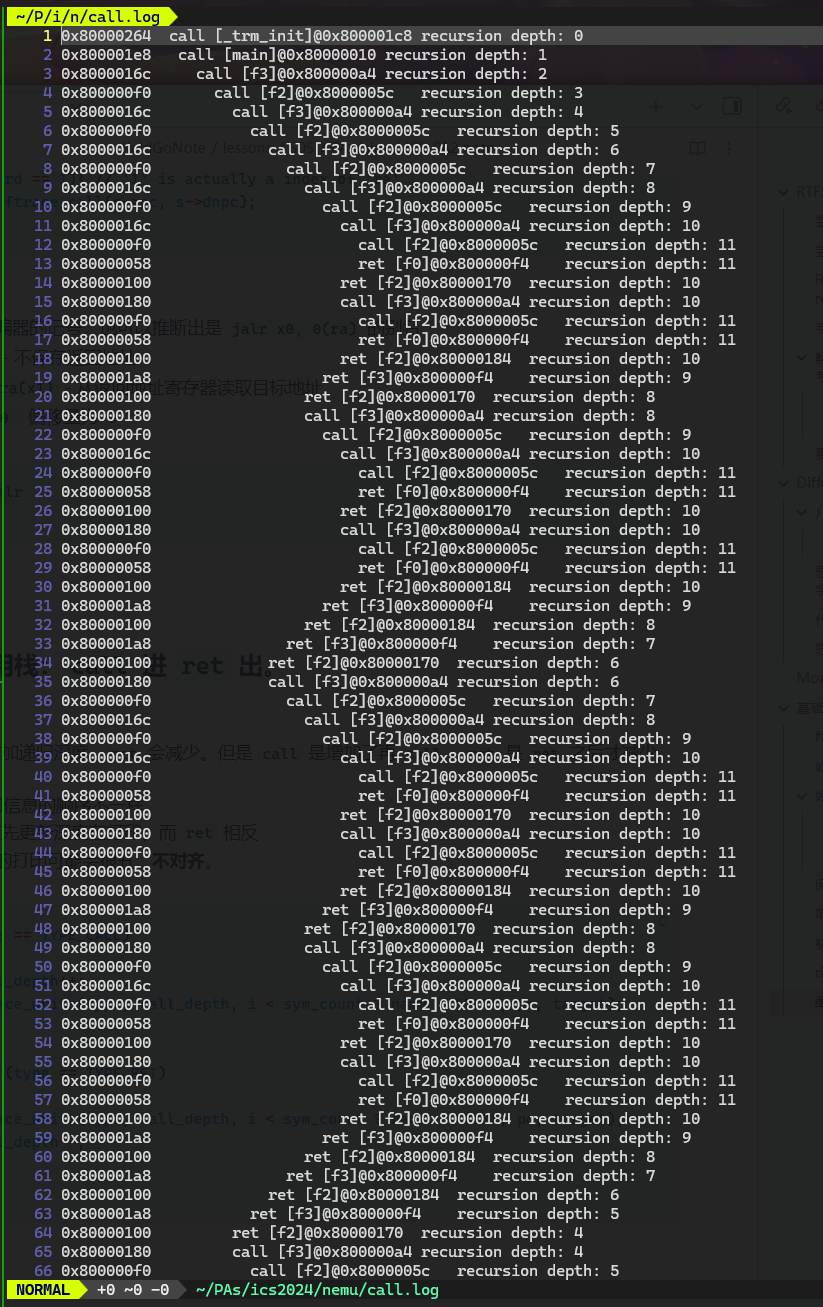
  • cputests/recurion.c
    image.png|400

Difftest

这部分的实现:

1
2
3
4
5
6
7
8
9
10
11
12
13
14
bool isa_difftest_checkregs(CPU_state *ref_r, vaddr_t pc)
{
int reg_num = ARRLEN(cpu.gpr);
for (int i = 0; i < reg_num; i++)
{
if (ref_r->gpr[i] != cpu.gpr[i]) {
return false;
}
}
if (ref_r->pc != cpu.pc) {
return false;
}
return true;
}

感激 Difftest 的理由

在跑 benchmark 测试的时候,新实现了 ori 指令,这是一个 I-type 的但我手滑输入成了 R 导致 imm 解析不正确,coremark 测试集 hit bad trap 而难以追踪。最后,使用 Difftest,我迅速定位到了导致程序这个状态机(主要是寄存器存储值)不一样的指令 ori,从而迅速解决了问题。(困扰了两个小时,再想到 Difftest 之后迎刃而解)

一键回归测试

记得经常回归测试!具体方案已经在预处理部分讲过了。

奇怪的错误码

为什么错误码是 1 呢? 你知道 make 程序是如何得到这个错误码的吗?
#TODO

IO

进行 hello 测试前,不要忘记在 menuconfig 中勾选 Device,否则 paddr.c 模块的 paddr_read()paddr_write() 不能正确处理 addr 是物理内存还是设备空间。从而报错。

时钟

8253 计时器初始化时会分别注册 0x48 处长度为 8 个字节的端口, 以及 0xa0000048 处长度为 8 字节的 MMIO 空间, 它们都会映射到两个 32 位的 RTC 寄存器. CPU 可以访问这两个寄存器来获得用 64 位表示的当前时间.

1
#define RTC_ADDR        (DEVICE_BASE + 0x0000048)
1
2
3
4
5
6
7
8
9
// abstract-machine/am/src/paltform/nemu/include/nemu.h
#define SERIAL_PORT (DEVICE_BASE + 0x00003f8)
#define KBD_ADDR (DEVICE_BASE + 0x0000060)
#define RTC_ADDR (DEVICE_BASE + 0x0000048)
#define VGACTL_ADDR (DEVICE_BASE + 0x0000100)
#define AUDIO_ADDR (DEVICE_BASE + 0x0000200)
#define DISK_ADDR (DEVICE_BASE + 0x0000300)
#define FB_ADDR (MMIO_BASE + 0x1000000)
#define AUDIO_SBUF_ADDR (MMIO_BASE + 0x1200000)

amstract-machine/am/include/amdev.h 为时钟定义了两个抽象寄存器

1
2
3
4
5
6
7
8
9
10
11
#define AM_DEVREG(id, reg, perm, ...) \
enum { AM_##reg = (id) }; \
typedef struct { __VA_ARGS__; } AM_##reg##_T;

AM_DEVREG( 1, UART_CONFIG, RD, bool present);
AM_DEVREG( 2, UART_TX, WR, char data);
AM_DEVREG( 3, UART_RX, RD, char data);
AM_DEVREG( 4, TIMER_CONFIG, RD, bool present, has_rtc);
AM_DEVREG( 5, TIMER_RTC, RD, int year, month, day, hour, minute, second);
AM_DEVREG( 6, TIMER_UPTIME, RD, uint64_t us);

这是一个学习宏的好机会。
AM_##reg## 起到一个拼接的功能,会将字符串 "AM_"reg 这个宏给定的参数连成一个新的标识符。

__VA_ARGS__; 则是所有可变宏参数的集合

1
2
3
4
5
6
7
8
9
10
11
12
13
14
AM_DEVREG(1, UART_CONFIG, RD, bool present);
// 展开为:
enum { AM_UART_CONFIG = 1 };
typedef struct { bool present; } AM_UART_CONFIG_T;

AM_DEVREG(4, TIMER_CONFIG, RD, bool present, has_rtc);
// 展开为:
enum { AM_TIMER_CONFIG = 4 };
typedef struct { bool present, has_rtc; } AM_TIMER_CONFIG_T;

AM_DEVREG(5, TIMER_RTC, RD, int year, month, day, hour, minute, second);
// 展开为:
enum { AM_TIMER_RTC = 5 };
typedef struct { int year, month, day, hour, minute, second; } AM_TIMER_RTC_T;

am/src/platform/nemu/include/nemu.h 中有一些相关的输入输出函数可以使用

1
2
3
4
5
// abstract-machine/am/src/$ISA/$ISA.h

static inline uint8_t inb(uintptr_t addr) { return *(volatile uint8_t *)addr; }
static inline uint16_t inw(uintptr_t addr) { return *(volatile uint16_t *)addr; }
static inline uint32_t inl(uintptr_t addr) { return *(volatile uint32_t *)addr; }

我们是 32 机,想获得 32 的地址,可以用 inl 这个函数。

如何进行 real-time clock test 测试?

这需要我们阅读源代码。
/am-kernel/tests/am-tests/src/main.c 中定义了测试的入口。

1
2
3
4
5
6
7
8
9
10
11
12
13
14
15
16
17
18
19
20
21
22
23
24
25
26
27
28
29
30
31
32
33
34
35
36
37
38
39
#include <amtest.h>

void (*entry)() = NULL; // mp entry

static const char *tests[256] = {
['h'] = "hello",
['H'] = "display this help message",
['i'] = "interrupt/yield test",
['d'] = "scan devices",
['m'] = "multiprocessor test",
['t'] = "real-time clock test",
['k'] = "readkey test",
['v'] = "display test",
['a'] = "audio test",
['p'] = "x86 virtual memory test",
};

int main(const char *args) {
switch (args[0]) {
CASE('h', hello);
CASE('i', hello_intr, IOE, CTE(simple_trap));
CASE('d', devscan, IOE);
CASE('m', mp_print, MPE);
CASE('t', rtc_test, IOE);
CASE('k', keyboard_test, IOE);
CASE('v', video_test, IOE);
CASE('a', audio_test, IOE);
CASE('p', vm_test, CTE(vm_handler), VME(simple_pgalloc, simple_pgfree));
case 'H':
default:
printf("Usage: make run mainargs=*\n");
for (int ch = 0; ch < 256; ch++) {
if (tests[ch]) {
printf(" %c: %s\n", ch, tests[ch]);
}
}
}
return 0;
}

可见我们需要这样一个参数输入给 main 函数, 如果要执行 real-time clock test
由此,我们再阅读 am-kernel/tests/am-tests 中的 Makefile

综上所述,你可以用类似这样的命令运行不同的 am_test

1
make ARCH=$ISA-nemu run mainargs=h
  • 该命令会运行 hello test

运行 rtc_test 之后,我们来用 ftrace 看看调用栈。

1
2
3
4
5
6
7
8
9
10
11
12
13
14
15
16
0x80001044  call [_trm_init]@0x80000e4c 
0x80000ff4 call [main]@0x800010e8
0x80001128 call [ioe_init]@0x800011c4
0x800011c4 ret [$x]@0x8000112c
0x8000112c call [ioe_init]@0x8000117c
0x8000117c ret [$x]@0x80001130
0x80001130 call [ioe_init]@0x80001204
0x80001204 ret [$x]@0x80001134
0x80001140 ret [ioe_init]@0x80000ff8
0x80000ff8 call [main]@0x80000aec
0x80000b4c call [rtc_test]@0x80001144
0x80001194 ret [__am_timer_uptime]@0x80000b50
0x80000b60 call [rtc_test]@0x80001858
0x800015ac ret [__udivmoddi4]@0x80000b64
0x80000b4c call [rtc_test]@0x80001144
/.../

该程序就是不断的调用 rtc_test,最终调用到 __am_timer_uptime 来更新信息的。

yzh 先生埋得雷

根据 pa manuel 和群友讨论,先更新低位或者高位似乎会影响跑分结果,这是 yzh 老师对大家的考验。

__am_timer_uptime 是怎么调用 nemu 这个系统来获得时间的?

我们在 am 层的访存最后也会翻译成机器指令交给 nemu 执行,
可以看一下 __am_timer_uptime ,其访问时钟本质也是访存,用的是 inl

1
2
3
// /abstract-machine/am/src/riscv/riscv.h
static inline uint32_t inl(uintptr_t addr)
{ return *(volatile uint32_t *)addr; }

这里我们使用 volatile 关键字避免 编辑器优化,其实也是保证 nemu 能够执行我们想要的访存命令。

所以 lw,lb,lh 等访存指令中有相关的信息。继续阅读 nemu 代码

上述翻译成机器代码,对时钟的访问则被 lw 出发 paddr_read,同时检测到是一个 DEVICE 就去 DEVICE 的内存空间 (mmio_read) 访问相应的设备(通过 map_read
那么,我们访问到时钟,就会触发回调函数。对于时钟来说就是下面的 rtc_io_handler

1
2
3
4
5
6
7
8
9
10
// 在nemu中,主函数会执行`init_device`初始化所有设备,会分配空间映射,绑定回调函数
// nemu/src/device/timer.c
static void rtc_io_handler(uint32_t offset, int len, bool is_write) {
assert(offset == 0 || offset == 4);
if (!is_write && offset == 4) {
uint64_t us = get_time();
rtc_port_base[0] = (uint32_t)us;
rtc_port_base[1] = us >> 32;
}
}

所以,如果先更新低位,则 offset==0,则 get_time 不会被执行,从而导致跑分异常(你的低位时间获取的是上一次的低位,而不是系统时间)。
解决方案可以是先更新高位,或者把 offset == 4 改为 offset == 0 并保留原来的先更新低位。

总结一下

现在 nemu 作为我们的系统,其会运行我们写的 am 层中的程序,阅读代码理解两方面的行为,合理使用 ftrace 和汇编代码等工具是很有必要的

image.png|400

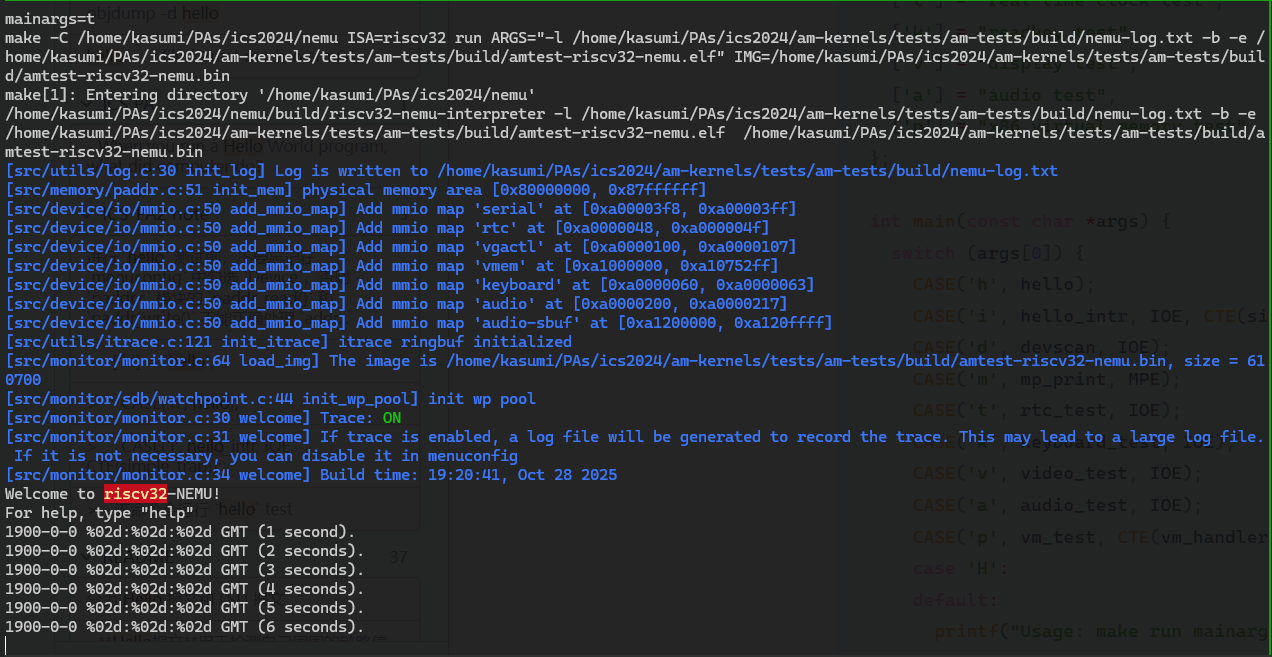
  • 正常运行了。

如果你的实现正确, 你将会看到程序每隔 1 秒往终端输出一行信息. 由于我们没有实现 AM_TIMER_RTC, 测试总是输出 1900 年 0 月 0 日 0 时 0 分 0 秒, 这属于正常行为, 可以忽略.

跑分测试

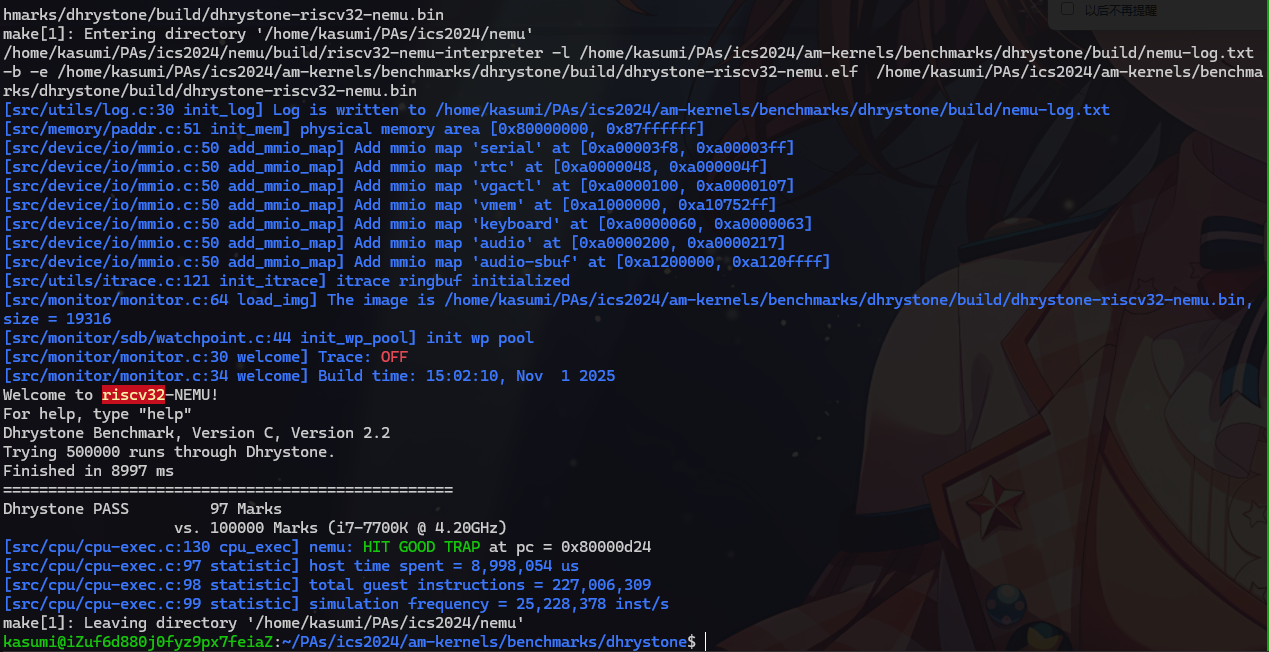
  • Aliyun - Ubuntu 22.04, 2g 2核 上跑分结果

    • image.png|400
    • 阿里云学生服务器的配置比较拉胯,跑分 97 应当是正确的结果。
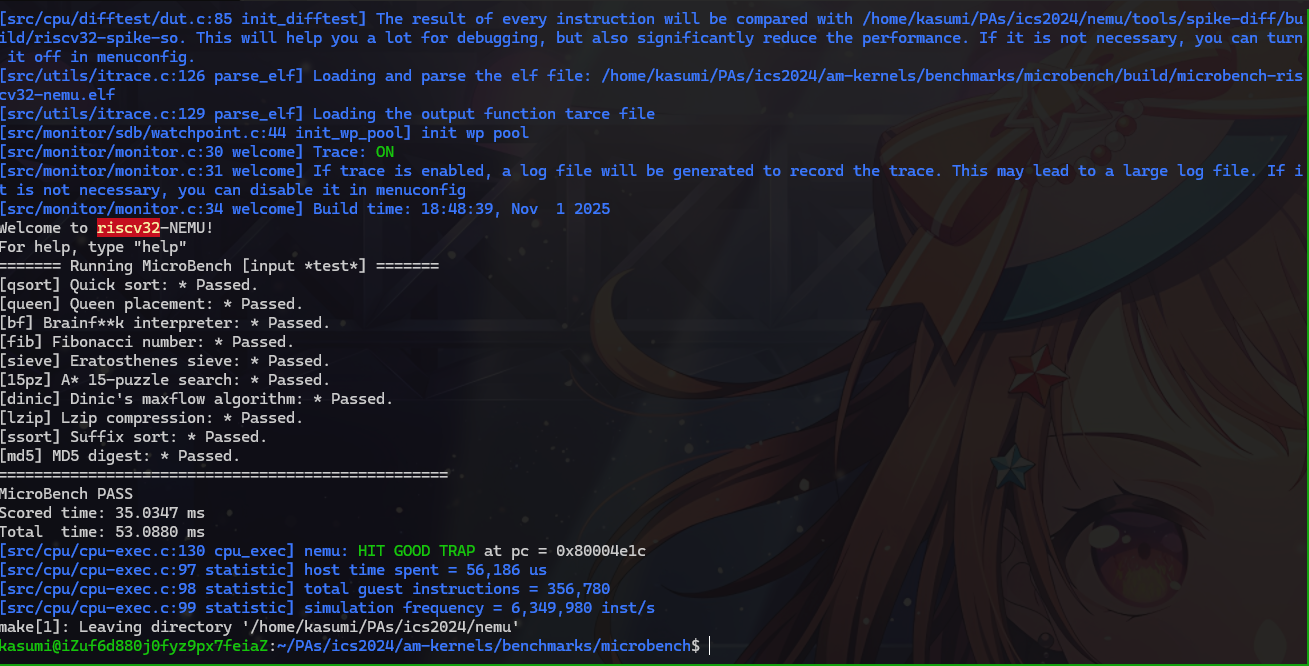
    • 克隆项目到 Ubuntu 虚拟机测试
  • image.png|400

    • microbench

**现在我们把 am-kernels/kernels/demo/include/io.h**中的 HAS_GUI 注释掉了,来看字符版本的 Bad Apple 吧!

am 层的 malloc 函数

阅读 elf 表可以发现 mario 频繁地调用了 malloc 函数。而我发生了访存错误,并且访存错误恰好是 init_mem 分配的 0 x 80000000 - 0 x 8 fffffff 的后一个字节。思考可能是我的 malloc 动了不该动的 heap. end 导致内存异常。
修改后,果然正常运行了 mario
malloc 在 am 层的本质是让 nemu 划分一部分内存给 am 使用。这里我们只是声明了一段地址归这个 malloc 所有,并将 malloc 使用过的地址位置维护一下。

键盘

nemu 中提供了对键盘的解读,这需要我们在 am 层维护队 keyboard 信息的维护,我们通过 inl 函数去调用 nemu 上的访问设备的函数,从而得到系统上 keyboard 的信息。
理解这一点,可能还要阅读一点 sdl 和 keyboard 相关的东西

VGA

VGA 初始化时注册了从 0 xa 1000000 开始的一段用于映射到 video memory (显存, 也叫 frame buffer, 帧缓冲) 的 MMIO 空间.

我们通过 RGB 来显示颜色。

1
#define FB_ADDR         (MMIO_BASE   + 0 x 1000000)

还记得 EasyX 的画图吗?每个像素管理后,你还需要 flush 一下。这里我们通过 sync 信号在 amnemu 之间沟通画面的刷新。

展示你的计算机系统

理解打字小游戏如何运行

打字小游戏如何运行?

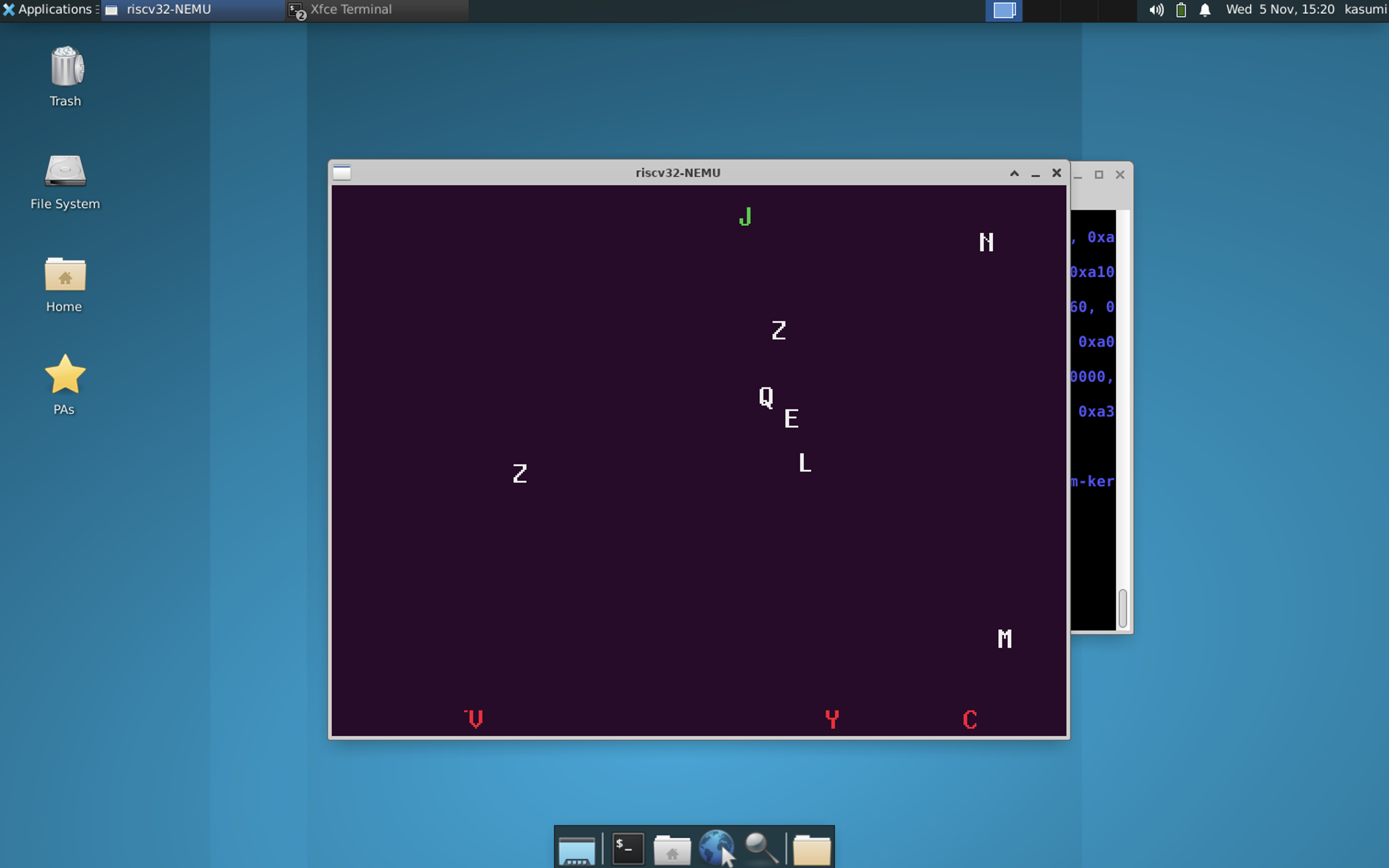
  • 附打字小游戏运行图。在阿里云服务器运行 xrcp+xrdp
  • image.png|400
    从微观角度
  • 程序是个状态机
    从宏观角度
  • 计算机是个抽象层

打字小游戏的运行有这么几个要素要理解

  • 如何检测按键行为?
  • 如何做出对按键行为的反应?
  • 如何将这种反应输出到画面展示的?

typing-game 的主程序 game. c 首先调用 ioe_init () 函数初始化了 timer, gpu, audio (not implement yet),然后调用 video_init () 初始化画面。
然后游戏进入主循环
FPS= frames per second, so int frames = (io_read (AM_TIMER_UPTIME). us - t 0) / (1000000 / FPS);

然后进入游戏更新逻辑的地方:

1
2
3
4
5
6
7
8
9
10
11
12
13
14
15
16
17
18
19
20
21
22
23
24
void game_logic_update (int frame) {
if (frame % (FPS / CPS) == 0) new_char ();
for (int i = 0; i < LENGTH (chars); i++) {
struct character *c = &chars[i];
if (c->ch) {
if (c->t > 0) {
if (--c->t == 0) {
c->ch = '\0';
}
} else {
c->y += c->v;
if (c->y < 0) {
c->ch = '\0';
}
if (c->y + CHAR_H >= screen_h) {
miss++;
c->v = 0;
c->y = screen_h - CHAR_H;
c->t = FPS;
}
}
}
}
}

这里的每个字母是一个结构体x, y 即坐标,ch 即其字母,是随机生成的。t 应该是每个字母的存活时间,默认为 0,在掉落 miss 后字母会存活原地 30 FPS 再离去。 v 是字母的运动速度
游戏更新逻辑:

  • 检测是否需要产生新字母
    • CPS: it may refer to Char Per Second, so FPS / CPS is frames per char is generated
  • 更新字母逻辑
    • 更新字母位置:主要是按速度移动,c->y += c->v
    • 如果字母掉落仍未被键盘出发带走,则记录 miss 次数,并让字母在一个 FPS 内消失(这么说有点疑惑,实际表现就是一秒)
  • 操作逻辑
    • 游戏逻辑更新后
1
2
3
4
5
6
7
8
while (1) {
AM_INPUT_KEYBRD_T ev = io_read (AM_INPUT_KEYBRD);
if (ev. keycode == AM_KEY_NONE) break;
if (ev. keydown && ev. keycode == AM_KEY_ESCAPE) halt (0);
if (ev. keydown && lut[ev. keycode]) {
check_hit (lut[ev. keycode]);
}
};

其在我们 am 中定义的 AM_INPUT_KEYBRD 虚拟寄存器(实际指向 nemu 规定的键盘对应的内存空间)中获得键盘操作信息

  • 如果是 esc,就退出游戏,by halt (0)
  • 如果这是一个字母 ev. keydown && lut[ev. keycode]
    • 则检测是不是 hit 到了我们的游戏中的字母 check_hit (lut[ev. keycode])
    • 该函数遍历了 chars 即游戏中的字母。通过检测其速度是否大于 0(有效的游戏字母)且是最靠近最底下的字母((m < 0 || c->y > chars[m]. y))来找到要被我们打字 回去的字母
    • 如果没找到,就说明我们打错字了 , if (m==-1) wrong++
    • 否则 hit++,并让这个字飞回去。改个速度就行了。
    • chars[m]. v = -(screen_h - CHAR_H + 1) / (FPS);

这就是从微观层面,该游戏程序的状态转移过程。其每个状态在程序层面可以编码为 <frames, <the state of chars[NCHAR]>>,我们通过时钟更新 frames,并在不同帧位置生成字母,再加上通过检测键盘输入作为外部激励,改变字母的状态。

输出到画面的函数相对简单:

1
2
3
4
5
6
7
8
9
10
11
12
13
14
15
16
17
18
19
20
void render () {
static int x[NCHAR], y[NCHAR], n = 0;

for (int i = 0; i < n; i++) {
io_write (AM_GPU_FBDRAW, x[i], y[i], blank, CHAR_W, CHAR_H, false);
}

n = 0;
for (int i = 0; i < LENGTH (chars); i++) {
struct character *c = &chars[i];
if (c->ch) {
x[n] = c->x; y[n] = c->y; n++;
int col = (c->v > 0) ? WHITE : (c->v < 0 ? GREEN : RED);
io_write (AM_GPU_FBDRAW, c->x, c->y, texture[col][c->ch - 'A'], CHAR_W, CHAR_H, false);
}
}
io_write (AM_GPU_FBDRAW, 0, 0, NULL, 0, 0, true);
for (int i = 0; i < 40; i++) putch ('\b');
printf ("Hit: %d; Miss: %d; Wrong: %d", hit, miss, wrong);
}

就是对 FBDRAW 缓存区的画面写入。正常下降字母速度大于 0 为白色,上升的字母是正确的就是绿色,否则为红色
字体文件在另一个 font. c


从宏观上看,AM 层(Abstract Machine)负责游戏源码层面的硬件抽象设计。游戏程序并不直接访问具体硬件,而是通过 AM 提供的虚拟 ioe 接口(包括时钟、键盘、VGA 等)获取或写入数据。在 nemu 实际运行时,这些接口对应到一段模拟的内存区域,程序通过访问这段内存即可获得硬件状态。而这些内存中的数据,又是由底层通过 SDL 从宿主机(真机)的输入设备与显示系统中读取、同步得到的。

至于编译过程和最终执行到 nemu,可以参考[[#通过批处理模式运行 NEMU (理解 Makefile)|从批处理看Makefile组织]]

其他必答题

编译与链接 2

编译和链接

  1. nemu/include/common. h中添加一行volatile static int dummy; 然后重新编译 NEMU. 请问重新编译后的 NEMU 含有多少个dummy变量的实体? 你是如何得到这个结果的?
  2. 添加上题中的代码后, 再在nemu/include/debug. h中添加一行volatile static int dummy; 然后重新编译 NEMU. 请问此时的 NEMU 含有多少个dummy变量的实体? 与上题中dummy变量实体数目进行比较, 并解释本题的结果.
  3. 修改添加的代码, 为两处 dummy 变量进行初始化: volatile static int dummy = 0; 然后重新编译 NEMU. 你发现了什么问题? 为什么之前没有出现这样的问题? (回答完本题后可以删除添加的代码.)
    • 添加 volatile 后编译器不会优化, 理论上我们数出包含 common. h. c 文件即可。
    • 一个更保险的方法是直接阅读 elf 符号表
    • nm -a build/riscv 32-nemu-interpreter | grep dummy 会输出所有 dummy
1
2
3
4
5
6
7
8
9
10
11
12
13
14
15
16
17
18
19
20
21
22
23
24
25
26
27
28
29
30
31
32
33
34
35
36
37
38
kasumi@iZuf6d880j0fyz9px7feiaZ :~/PAs/ics 2024/nemu$ nm -a build/riscv 32-nemu-interpreter | grep dummy
0000000000012058 b dummy
00000000000120 c 0 b dummy
00000000000120 c 4 b dummy
00000000000120 d 0 b dummy
00000000000120 e 0 b dummy
0000000000013520 b dummy
0000000000013548 b dummy
0000000000013560 b dummy
0000000000013564 b dummy
0000000000013590 b dummy
0000000000013594 b dummy
00000000000137 c 0 b dummy
00000000000137 d 8 b dummy
0000000000013 a 00 b dummy
0000000000013 a 04 b dummy
0000000000013 a 28 b dummy
0000000000013 af 0 b dummy
0000000000014220 b dummy
0000000000014234 b dummy
000000000001 d 720 b dummy
000000000001 d 748 b dummy
000000000001 d 74 c b dummy
000000000001 d 758 b dummy
000000000001 d 7 b 8 b dummy
000000000001 d 7 c 8 b dummy
000000000801 e 000 b dummy
000000000801 e 004 b dummy
000000000801 e 008 b dummy
000000000801 e 00 c b dummy
000000000801 e 010 b dummy
000000000801 e 014 b dummy
000000000801 e 018 b dummy
000000000801 e 01 c b dummy
000000000801 e 020 b dummy
000000000801 e 024 b dummy
00000000000027 c 0 t frame_dummy
00000000000109 d 0 d __frame_dummy_init_array_entry
  • 这些 dummy 前面的字母 b 代表变量位于 BSS 段,而不是全局可见符号,符合 static 定义。
    nm -a build/riscv 32-nemu-interpreter | grep "b dummy" -c
    output 35

所以一共 35dummy

  1. 添加上题中的代码后, 再在 nemu/include/debug. h 中添加一行 volatile static int dummy; 然后重新编译 NEMU. 请问此时的 NEMU 含有多少个 dummy 变量的实体? 与上题中 dummy 变量实体数目进行比较, 并解释本题的结果.
    干活!

添加后仍然是 35

1
2
kasumi@iZuf6d880j0fyz9px7feiaZ :~/PAs/ics 2024/nemu$ nm -a build/riscv 32-nemu-interpreter | grep "b dummy" -c
35
  • static → 每个 . c 文件独立拥有一份;即编译单元内只有一个。
  • 多个头文件定义同名 static → 在同一个编译单元中仍只算一份;
  • 所以从 common. hdebug. h 各加一行不会翻倍。
  1. 修改添加的代码, 为两处 dummy 变量进行初始化: volatile static int dummy = 0; 然后重新编译 NEMU. 你发现了什么问题? 为什么之前没有出现这样的问题? (回答完本题后可以删除添加的代码.)

在同时包含了 common. hdebug. hdummy 的编译单元发生了 redefinition error

1
2
3
4
5
6
error: redefinition of ‘dummy’
52 | volatile static int dummy=0;
| ^~~~~
In file included from /home/kasumi/PAs/ics 2024/nemu/include/debug. h: 19,
from /home/kasumi/PAs/ics 2024/nemu/include/common. h: 47,
from src/device/device. c:16:

Declaration and Definition (真是一对苦命鸳鸯)

This error is actually because the difference between Declaration and Definition
When you write down volatile static int dummy;, it’s a declaration, to tell the interpreter there is a static variable dummy, but no alloc store space, no initialize.
While, for valatile static int dummy =0, it’s a definition. When an interpret unit appear 2 definition for same-named static variable, a error caused.

声明 Declaration 是可重复的,定义则不可以。


了解 Makefile

了解 Makefile

请描述你在 am-kernels/kernels/hello/ 目录下敲入 make ARCH=$ISA-nemu 后, make 程序如何组织. c 和. h 文件, 最终生成可执行文件 am-kernels/kernels/hello/build/hello-$ISA-nemu. elf. (这个问题包括两个方面: Makefile 的工作方式和编译链接的过程.)

我在[[#通过批处理模式运行 NEMU (理解 Makefile)|批处理部分]] 做的分析就可以回答这个问题, 其虽然在 cpu-tests 目录做的分析,但和 hello 只有多了一个 ioe 层的 . h, .c 组织的问题,并没有本质区别,这里不再赘述。
批处理部分